
Signal Example — Convolution
Interactive demo showing discrete convolution by sliding a kernel across a signal, with three kernel types including a Morlet wavelet to bridge filtering and time-frequency analysis.
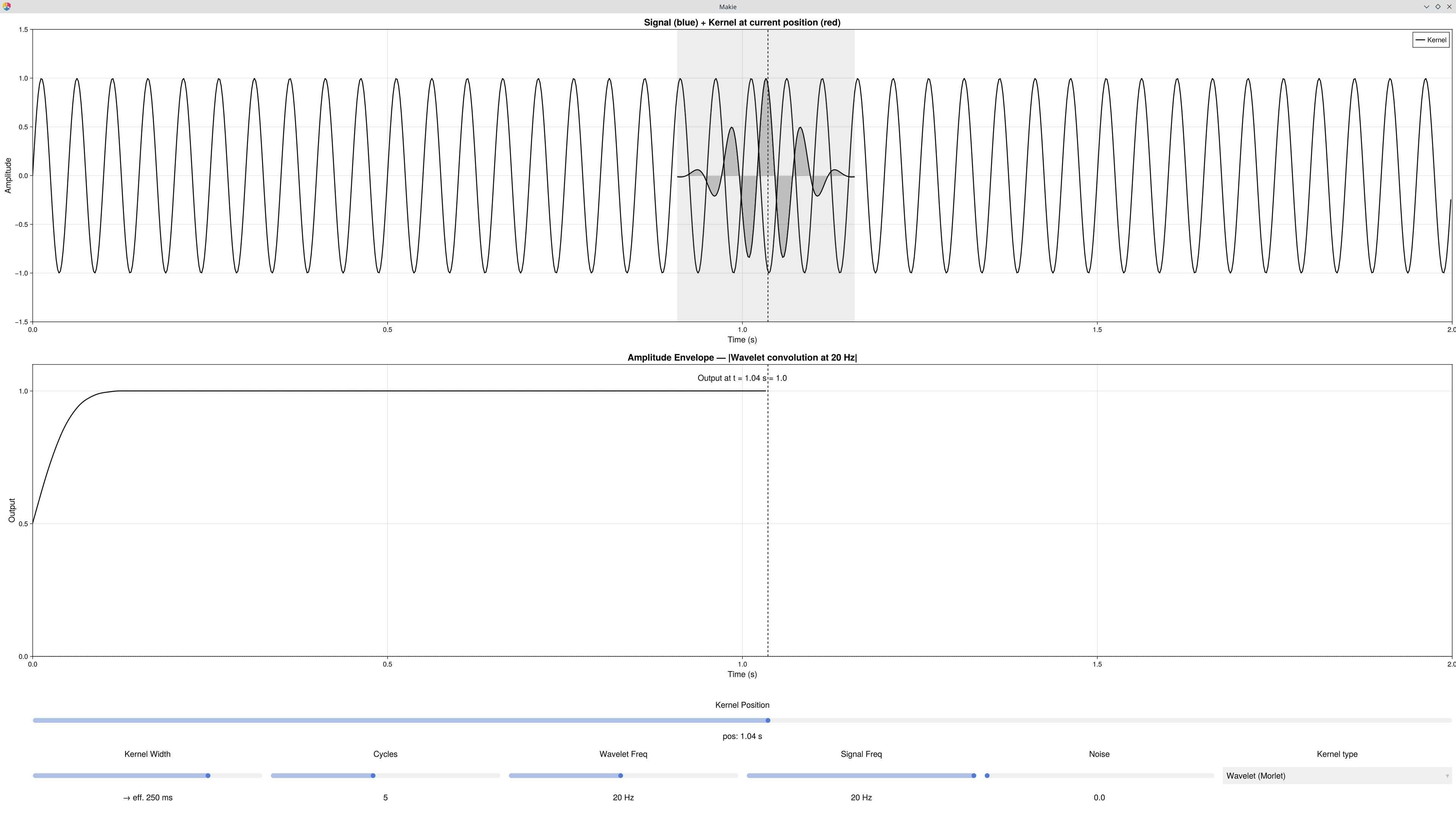
What it shows
| Row | Plot | Description |
|---|---|---|
| 1 | Signal + Kernel | The input signal with the kernel overlaid at the current position — the shaded band marks the overlap region. |
| 2 | Output | The convolution result accumulated up to the current kernel position. For the Wavelet kernel, this is the amplitude envelope. |
Key Concept
Convolution computes, at each time point t, the weighted sum of the signal under the kernel:
Gaussian: smooth low-pass filter — noise suppressed, slow waves preserved.
Boxcar: running average — same idea but with sharper edges in frequency.
Wavelet (Morlet): Gaussian × cos(2πfτ) — the kernel is frequency-selective. The output is the amplitude envelope: how much of Wavelet Freq is present at each time point. This is one row of a time-frequency spectrogram.
Controls
| Control | Applies to | Description |
|---|---|---|
| Kernel Position | All | Scrub the kernel across the signal — output builds up as you drag right |
| Kernel Width | Gaussian / Boxcar | Total span of the kernel (label updates to "→ eff. X ms" in Wavelet mode) |
| Cycles | Wavelet | Number of oscillations in the kernel — more cycles = better frequency resolution, worse time resolution |
| Wavelet Freq | Wavelet | The target frequency to detect |
| Signal Freq | All | Frequency of the input signal |
| Noise | All | Additive Gaussian noise |
| Kernel type | All | Switch between Gaussian, Boxcar, Wavelet (Morlet) |
Things to Try
Low-pass filtering: Gaussian kernel, drag position to end — output is a smoother version of the noisy input.
Kernel width effect: Gaussian, widen the kernel → noise disappears, but the sine is also attenuated as the kernel begins to span whole cycles.
Switch to Wavelet Freq = Signal Freq → amplitude envelope is near 1.0 (frequency detected).
Mismatch frequencies (e.g. Wavelet = 8 Hz, Signal = 4 Hz) → envelope near 0.
Cycles tradeoff: with two nearby signal frequencies, fewer cycles blurs them together; more cycles separates them.
Link to Gaussian: set Kernel Width = value shown in "→ eff. X ms" label, then switch kernel type — you will see the same Gaussian envelope.
See Also
Signal Example — Composition — building signals from sine waves
Signal Example — Dot Product — the core dot product mechanism
Signal Example — Spectrum — the full FFT spectrum
Signal Example — Time-Frequency — running Morlet convolution at every frequency
Cohen, M. X. (2014). Analyzing Neural Time Series Data. MIT Press. — Chapter 11/12
Code
using EegFun
EegFun.signal_example_convolution()